Withdraw
Withdraw is only allowed after Initiate Withdraw is called. Withdraw will transfer locked $RAZOR tokens to the user's address.
Using Razorscan (Recommended for beginners)
Step 1
Visit https://razorscan.io/
Note: We recommend that all Delegators bookmark this specific URL to prevent any phishing attacks.

Step 2
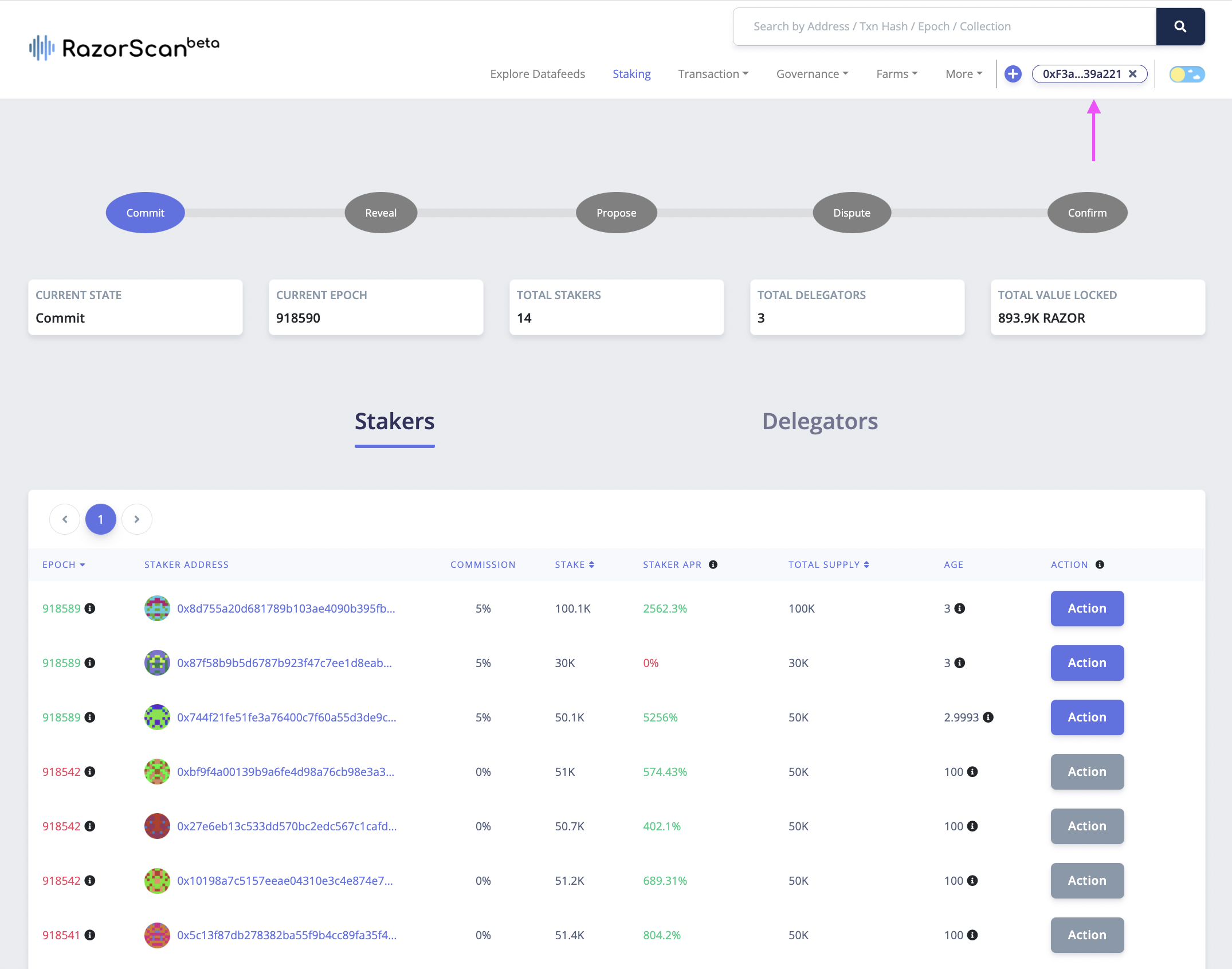
Now, click on “Connect Wallet” from the top right corner and make sure your network is set to "Europa Defi Hub". Next, visit https://razorscan.io/staking or click on “Staking” from the menu bar on the header and you should see the screen below:
Step 3
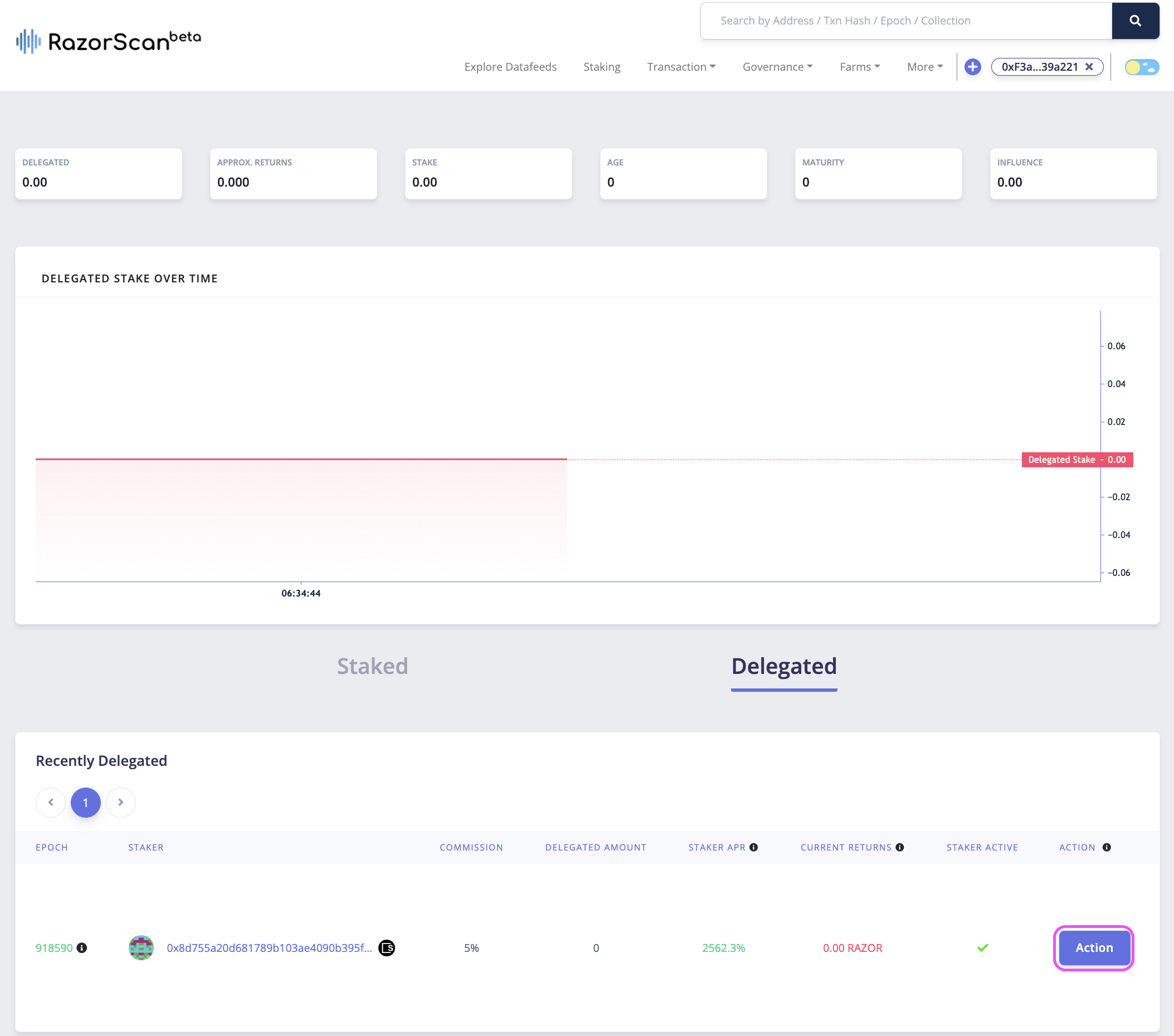
Click on your connected wallet address to get information on your actions. Navigate to the Delegated section on your page. Clicking on the "Action" will show you a list of actions that are allowed in the current Epoch.
Note: Same action can be performed from staking page by finding the staker address and clicking on Action.
Step 4
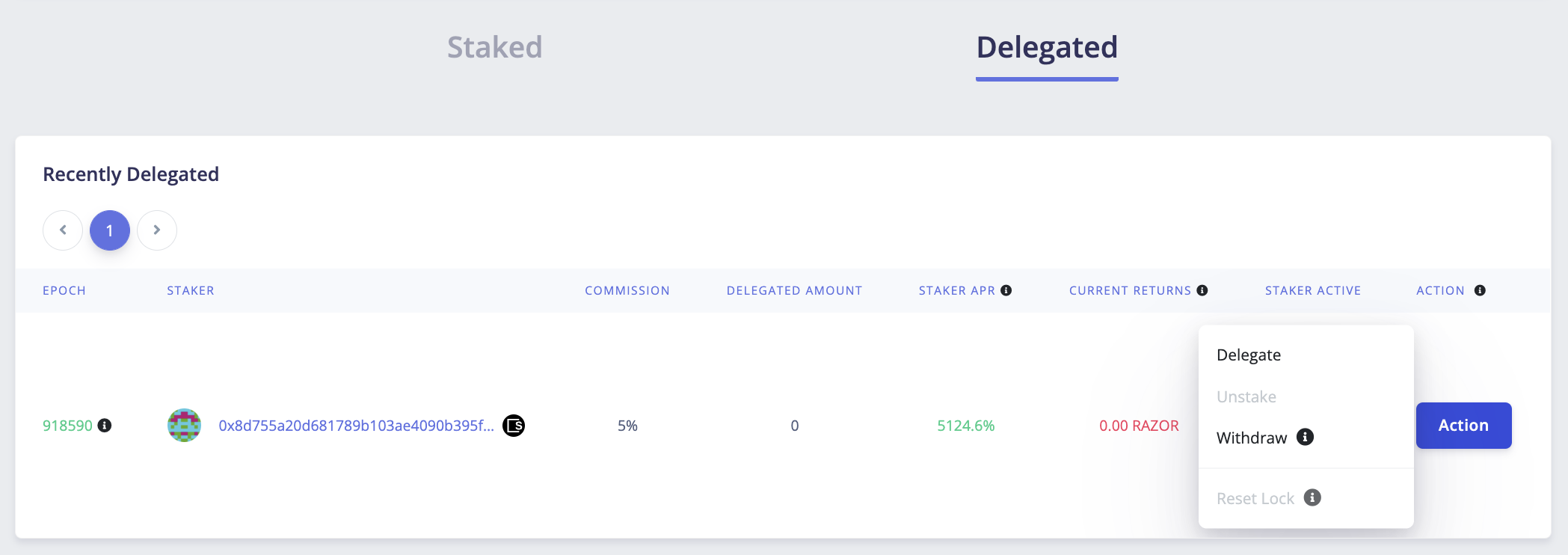
Once you have Initiated withdraw and withdrawAfterPeriod has passed, you can withdraw your RAZOR tokens any time. This can be done by clicking on staker action and then Withdraw.
Step 5
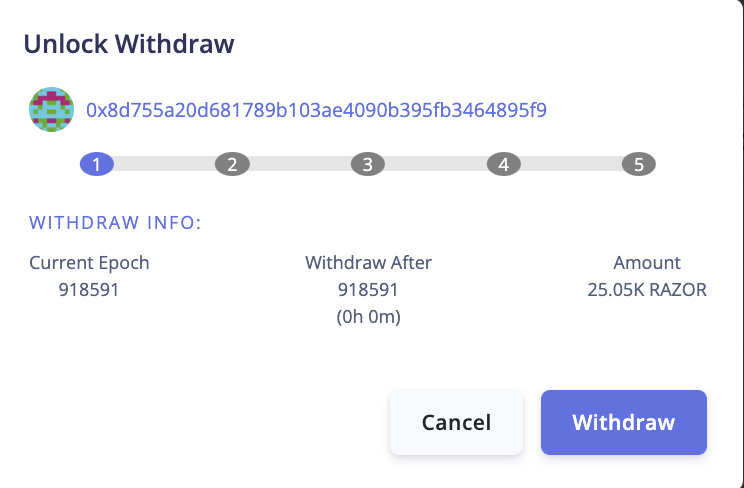
Clicking on Withdraw will open a modal to withdraw the locked RAZOR. You can confirm the details if you would like and then click on Withdraw on the modal. Confirm the transaction, and your $RAZOR will be sent to your address.
Using SKALE Block Explorer (Alternative method)
This method allows you to withdraw (unlock) your RAZOR tokens directly by interacting with the StakeManager smart contract through the SKALE Block Explorer. This is the final step in the withdrawal process and will transfer your locked RAZOR tokens back to your wallet.
Prerequisites
Before withdrawing via the block explorer, ensure you have:
- Metamask wallet installed and configured
- Europa Defi Hub network added to Metamask (see network details)
- sFUEL tokens for gas fees (get from SKALE Portal after connecting wallet)
- Completed initiate withdraw - You must have called Initiate Withdraw previously
- Withdraw lock expired - The
withdrawLockPeriodmust have passed
Contract Addresses
Mainnet (Europa Defi Hub):
- StakeManager:
0xd492408e4901CF658c7874285984F6D5Db648D1E
Testnet (Europa Defi Hub Testnet):
- StakeManager:
0xbeCf5d1b74d0C2A6388c65491BBb4aD3880cD012
Step-by-Step Instructions
Step 1: Verify Withdraw Lock Status
Before calling withdraw, verify your withdraw lock is ready:
- Visit the StakeManager contract on the block explorer (links above)
- Go to the "Read Contract" tab
- Find the
locksfunction - Enter your parameters:
- address: Your wallet address
- tokenAddress: The sRZR token address for your staker
- lockType:
1(for Withdraw lock)
- Click "Query" and check the result:
amount: Should be greater than 0 (this is the RAZOR amount you'll receive)unlockAfter: Should be less than or equal to current epoch
If unlockAfter is still greater than the current epoch, wait until the lock period expires.
Step 2: Find Your Staker ID
You need the Staker ID for your staker:
- Visit the StakeManager contract on the block explorer (links above)
- Go to the "Read Contract" tab
- Find the
getStakerIdfunction - Enter your wallet address
- Click "Query" - the result is your Staker ID
Alternatively, you can find your Staker ID on Razorscan.
Step 3: Navigate to StakeManager Contract
Visit the StakeManager contract on the block explorer:
Click "Connect Wallet" and approve the Metamask connection
Verify your wallet is connected and you're on the correct network (Europa Defi Hub)
Step 4: Execute Unlock Withdraw Function
Navigate to the "Write Contract" tab
Scroll down and find the
unlockWithdrawfunctionFill in the parameters:
- stakerId (uint32): Enter your Staker ID from Step 2 (e.g.,
42)
- stakerId (uint32): Enter your Staker ID from Step 2 (e.g.,
Click "Write" to submit the transaction
Review the transaction details in the Metamask popup
Click "Confirm" in Metamask
Important Notes:
- This function only requires the Staker ID parameter
- It will transfer your locked RAZOR tokens to your wallet
- This resets both your unstake and withdraw locks
- After withdrawal, you can stake or delegate again if you wish
Step 5: Verify Transaction
- After confirming in Metamask, wait for the transaction to be processed
- Once confirmed, you'll see a success message in the block explorer
- Click on the transaction hash to view transaction details
- You can verify your withdrawal by:
- Checking the transaction logs for a
Withdrewevent - Checking your RAZOR token balance in Metamask
- Visiting your wallet on Razorscan to verify locks are cleared
- Checking the transaction logs for a
Step 6: Verify Your RAZOR Balance
Your RAZOR tokens have been transferred back to your wallet:
- Open Metamask and ensure you're on Europa Defi Hub network
- Check your RAZOR token balance
- You can now use these tokens as you wish (stake again, transfer, etc.)
Common Issues and Troubleshooting
Transaction fails with "Did not initiate withdraw"
- You don't have an active withdraw lock
- You must call Initiate Withdraw first
Transaction fails with "Withdraw epoch not reached"
- The withdraw lock period hasn't expired yet
- Wait until the
unlockAfterepoch has passed - Check your lock status using the method in Step 1
Transaction fails with "staker doesnt exist"
- Invalid Staker ID
- Double-check your Staker ID is correct
No RAZOR received after successful transaction
- Check if you're looking at the correct wallet address
- Verify the transaction was actually successful in the block explorer
- Check transaction logs for the
Withdrewevent to see the amount transferred
Understanding the Complete Withdrawal Process
Congratulations! You've completed the full withdrawal process:
- Unstake: Locked sRZR tokens for 300 epochs ✓
- Initiate Withdraw: Burned sRZR and locked RAZOR for 300 epochs ✓
- Withdraw (this step): Claimed locked RAZOR tokens ✓
What happens after withdrawal:
- All your locks (unstake and withdraw) are reset
- You can stake or delegate again immediately if you wish
- Your RAZOR tokens are fully liquid in your wallet
Lock Periods Summary
For reference, here's the complete timeline:
- Epoch T: Unstake called
- Epoch T+300: Can call Initiate Withdraw (must do before T+450)
- Epoch T2: Initiate Withdraw called
- Epoch T2+300: Can call Withdraw (anytime after this)
Current network parameters (verify on Razorscan Governance):
- unstakeLockPeriod: 300 epochs
- withdrawInitiationPeriod: 150 epochs (window to call initiate withdraw)
- withdrawLockPeriod: 300 epochs
Next Steps After Withdrawal
Now that you've successfully withdrawn your RAZOR tokens, you can:
- Stake again - Become a validator by calling Stake
- Delegate again - Delegate to a validator by calling Delegate
- Transfer tokens - Send RAZOR to another address
- Bridge tokens - Move RAZOR to Ethereum via SKALE Portal Bridge
Related Operations
Before this operation:
- Unstake - Step 1 of the withdrawal process
- Initiate Withdraw - Step 2 of the withdrawal process
After this operation (optional):